
Blog
 Anne
AnneIf you are building a Shopify store, you may have noticed a small line of text in the footer that says Powered by Shopify. While this is completely normal, many store owners prefer to remove it to keep their brand experience clean and fully customized.
The good news is that removing the Powered by Shopify text is simple, and you do not need advanced technical knowledge to do it. In this guide, we will walk through three reliable ways to remove the Powered by Shopify text at the bottom of a Shopify store, so you can choose the method that best fits your theme and comfort level.
Why Remove the Powered by Shopify Text
Many Shopify merchants remove this footer text for branding reasons. A custom footer looks more professional and keeps customers focused on your brand rather than the platform behind it. This is especially useful for growing brands and stores targeting international customers who expect a polished experience.
Method One: Remove Powered by Shopify Using Shopify Admin
This is the easiest method, especially if you are using a free Shopify theme.
Start by logging in to your Shopify Admin dashboard. From there, go to Online Store and then Themes. Find your active theme and click the three dot menu next to it. Choose Edit default theme content.

Once the theme content editor opens, use the search bar and type powered. You should see a field labeled Powered by Shopify. Replace the text inside this field with any text you wish to place here. After that, click Save.
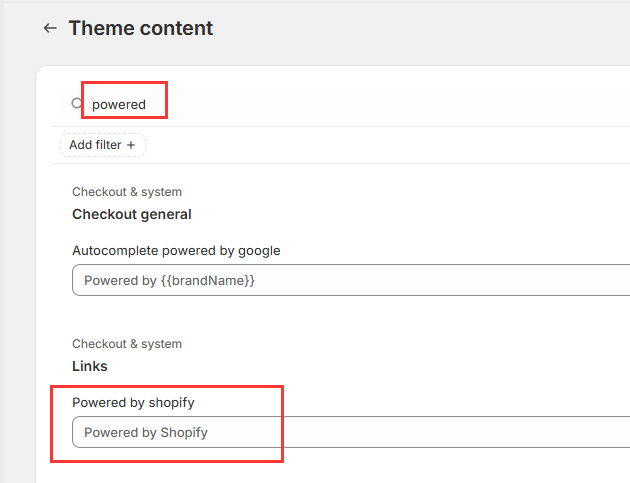
The text you enter here will replace the "Powered by Shopify" text in your store footer. However, the link will still direct users to the Shopify homepage when clicked.
Horizon Theme Users
If you are using a Horizon series theme, removing the Powered by Shopify text is even easier. You do not need to edit theme language settings or touch any code.
Simply open the theme editor, scroll to the footer section, and click on the Powered by Shopify text. In the settings panel on the right side, you will see an option called Show “Powered by Shopify”. Turn this option off, save the changes, and the link will be removed immediately.
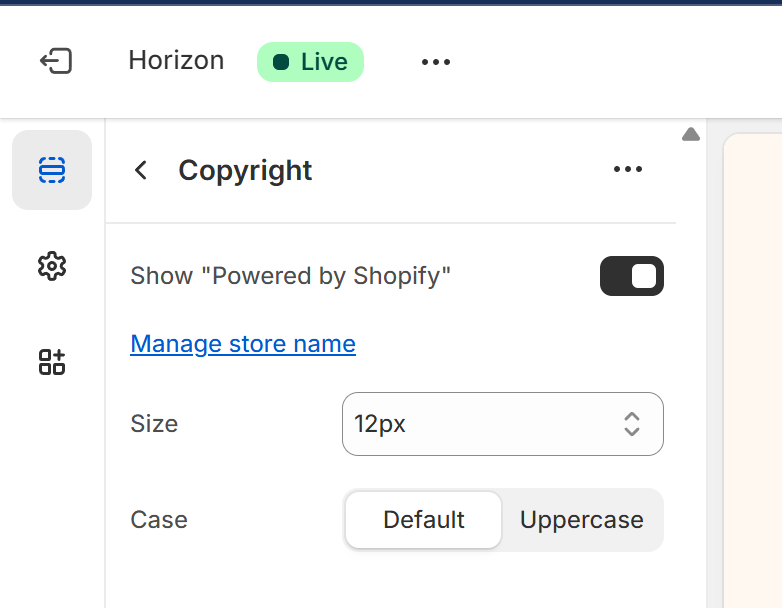
This is the safest and fastest option for Horizon themes, especially if you want to avoid code changes entirely.
Method Two: Remove Powered by Shopify by Editing Theme Code
If the first method does not work or you are using a custom or premium theme, editing the theme code is a reliable option. This method works for all Shopify themes, but it is a good idea to make a backup of your theme before editing code.
Go to Online Store and then Themes. Click the three dot menu next to your active theme and select Edit code. In the file list on the left, look for a file named footer.liquid and open it.
Inside this file, search for the following code:
{{ powered_by_link }}
Once you find it, you can either delete this line completely or comment it out. After making the change, save the file. Refresh your storefront and the Powered by Shopify text should no longer appear.

Method Three: Hide Powered by Shopify Using CSS
If you cannot remove the text using the admin settings or code editing, you can hide it with CSS. This does not remove the text from the theme files, but it hides it visually from customers.
Go to Online Store, then Themes, then Edit code. Open the base.css file. Scroll to the bottom and add the following CSS rule:
Dawn Theme:
footer small.copyright__content:nth-of-type(2) {
display: none;
}Horizon Themes:
.footer-utilities__text a:nth-of-type(2) {
display: none;
}Save the file and refresh your store. The Powered by Shopify text should now be hidden from the footer.
Which Method Should You Use
If you prefer not to touch any code, the admin method is the best choice. For custom themes or advanced setups, editing the footer.liquid file gives you full control. CSS hiding is best used as a fallback when the other methods are not available.
Removing the Powered by Shopify text is a small change, but it helps your store feel more branded and professional. If you are working on deeper Shopify customization or want help making your store truly unique, this is often just the first step.
For any questions or further assistance, please don't hesitate to reach out. Simply leave us a message, and we will respond to you as soon as possible. We're here to help and look forward to working with you!